Who Is Tracking My Phone?
- 3.9
- Rating
- 1.00M
- Installs
- Free
- Price

 Analysis by App-foxy
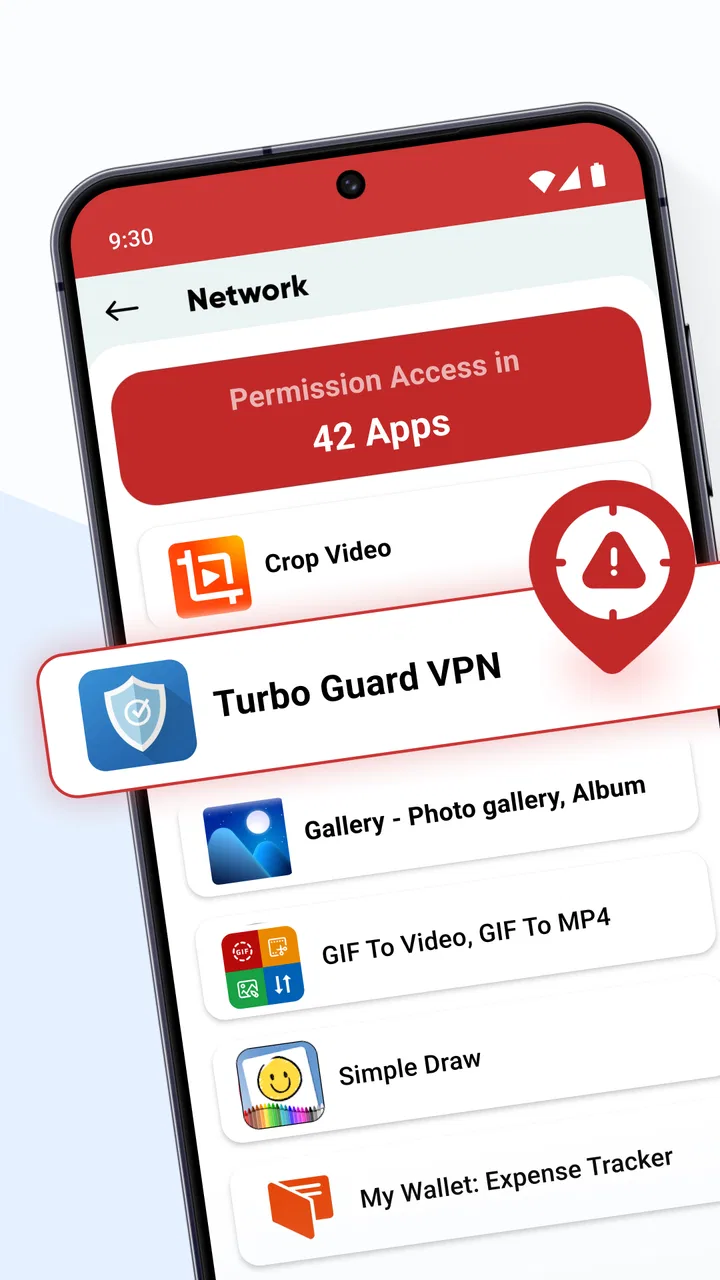
Most people only think about app permissions when something feels wrong: a phone becomes unusually busy, an unfamiliar app appears, or a privacy prompt arrives at an inconvenient moment. The difficult part is not knowing that permissions matter; it is remembering which installed apps can access sensitive parts of the device and deciding what still makes sense. Who Is Tracking My Phone? is built for that recurring check. It is a free tools app from GeniusTools Labs that helps me review installed-app permissions and manage access that seems unnecessary.
I found its value less in dramatic warnings and more in turning a vague privacy concern into a practical sorting task. Instead of opening applications one by one and searching through system menus, I can use a single place to inspect what is installed and identify permissions worth revisiting. That makes it useful for people who have accumulated apps over time, especially after changing phones, trying temporary utilities, or installing something for one specific event and then forgetting about it.
The app is available to everyone and supports devices running Android 8.0 or later. It is free to install, although it includes optional purchases ranging from $0.99 to $99.99 per item. Its current version is 2.2.3, and it has passed the one-million-install mark. Those figures suggest that it is aimed at ordinary Android users rather than only technical enthusiasts, which matches my experience: the main idea is easy to understand even if permission management itself still requires some judgement.
You May Also Like

 Blood Strike: 2.5 Anniversary
Blood Strike’s Loadouts Turn Every Drop Into a Tactical Gamble
A close look at Blood Strike’s custom loadouts: how fast access to signature weapons reshapes its battle royale rhythm, rewards preparation, and narrows the gap between fights.

 Pandora - Music & Podcasts
Pandora’s Music Is Easy to Start, but Harder to Recover
Pandora’s strength is its low-effort path from a seed to a station. Its weak spot is how much confidence it asks you to place in connection, setup, and quiet recovery.

 8 Ball Pool
 Is Built on Rivalries, Rematches, and Routine
A close look at the rivalries, rematches, shared routines, and unanswered safety questions that turn a quick pool match into a persistent mobile community.

 Samsung Music
’s Quiet Strength Is Playing What You Already Own
Its reach comes less from spectacle than from dependable access to a personal library. That simplicity is both the app’s strongest retention engine and its ceiling.

 AccuWeather: Weather Radar
AccuWeather Review: A Quick, Clear Forecast for Everyday Decisions
For everyday plans, the best forecast is the one you can understand quickly. AccuWeather makes rain timing, radar, and local conditions easy to act on, with a few trade-offs.

 Hill Climb Racing
Why Hill Climb Racing Still Turns Crashes Into One More Run
A tiny car, a bumpy hill and one more upgrade: Hill Climb Racing keeps resurfacing because its simple chaos makes every near-miss feel personal.
More From Our News Desk



Turning a vague privacy worry into a useful check
I find permission checks most useful when I treat them as a small, repeatable routine rather than a reaction to a scare. In this section, I’ll focus on how to turn the app’s overview into a sensible review: start with unfamiliar or temporary installs, then judge each permission against what you actually use the app for. That keeps the check practical, not alarm-driven.
Why permission reviews become a chore
Android already provides permission controls, but the usual route can be scattered. I may remember an app by its icon but not know whether it can use the camera, microphone, contacts, location, or other sensitive areas. If I have to open each app's information page separately, the task quickly becomes something I postpone. That is where this utility earns its place: it gives the review a clear starting point instead of making me reconstruct my app history from memory.
The important distinction is that this is a permission-management tool, not a magic detector that automatically proves an app is malicious. Seeing access does not, by itself, establish bad intent. A navigation app may reasonably need location, a messaging app may need contacts, and a camera editor may need access to photos. The useful question is whether the permission fits the app's purpose and whether I still want that access today.
That nuance matters because privacy tools can create unnecessary alarm when they treat every permission as suspicious. I prefer using this app as an audit assistant. It helps me notice unusual or forgotten access, while the final decision remains mine. That approach is more reliable than blindly revoking everything, which can break ordinary features or make an app behave unpredictably.
The first review is where the biggest benefit appears
On a first pass, I would not try to change every permission immediately. I would begin with apps I no longer recognize, apps installed for short-term use, and apps that have not been opened in a long time. This creates a manageable list of candidates. The next step is to compare the permission with the app's actual job. A simple flashlight should not need the same level of access as a video-calling tool, and a wallpaper app deserves a different level of scrutiny from a banking application.
One of the most useful habits is to separate “not needed now” from “never acceptable.” If an app only needs location during use, limiting it to that situation may be more sensible than removing access completely. If I do not use the app at all, uninstalling it is often cleaner than spending time fine-tuning its permissions. The app helps surface these choices, but it does not remove the need for common sense.
I also recommend checking after installing a group of new apps rather than waiting for a problem. Reviewing five recent additions is less tiring than auditing an entire phone after months of accumulation. This is a small workflow change, but it is one of the practical advantages of having a dedicated utility: the task becomes repeatable instead of becoming an emergency response.
What the setup feels like in real use
The first useful session is not about configuring a complicated dashboard. It is about letting the app present the installed-app permission picture and then deciding where attention is warranted. I would keep the system permission screen available while making changes, because Android's own controls remain the final authority. That extra check is especially helpful when a permission has different modes, such as allowing access only while an app is being used.
A good setup routine is to start with high-impact permissions, then move to less sensitive ones. Camera, microphone, location, contacts, and files can affect privacy in very different ways, so I would inspect them before spending time on minor access. I would also note which apps are essential before changing anything. If a work app or authentication tool stops working, I want to know what I changed and why.
The app's plain-language purpose makes it approachable for a family member who finds Android settings confusing. I can explain the process as “look at what each app can reach, then keep only what fits,” rather than teaching a long series of system-menu paths. That does not make the decisions automatic, but it lowers the barrier to beginning them.
A realistic everyday scenario
Imagine installing a document scanner for a single form, a photo editor for a school project, and a discount app for a weekend event. Weeks later, all three remain on the phone. The scanner may still have access to files, the editor may retain photo access, and the discount app may have requested location even though the event is over. Without a reminder, these permissions are easy to overlook.
This is the kind of situation where I would open Who Is Tracking My Phone? and review the temporary apps together. I would first decide whether each app is still worth keeping. Then I would compare its remaining access with what I actually do. Removing an unused app is the cleanest answer in one case; narrowing access is better in another. The time saved comes from finding the candidates quickly, not from an automated verdict.
Useful habits beyond the obvious scan
A less obvious benefit is that permission review can reveal app clutter, not just privacy exposure. When I see an app I no longer remember installing, I have a prompt to ask whether it still serves a purpose. Uninstalling forgotten utilities can simplify the phone and reduce future maintenance. The tool therefore works best as part of a broader cleanup session, even though its central job remains permission management.
Another useful tactic is to review permissions after lending a phone to a child or relative. New games, filters, and novelty utilities often arrive during those sessions, and the owner may not know what was accepted during installation. Rather than questioning every app individually, I can use the utility to create a short inspection list, then discuss why a particular permission is appropriate or unnecessary.
A third insight is to treat permission changes as reversible experiments. If an app still works after access is removed, I have learned that the permission was not essential for my normal use. If a feature fails, I can restore the setting through Android. This approach is safer than assuming every request is either harmless or dangerous. It also gives me a practical way to reduce access without abandoning an app I genuinely need.
Where it saves time, and where it does not
The main friction it removes is navigation. Android's built-in controls are useful, but they are designed as general system settings rather than as a focused audit experience. This app gives the task a privacy-first context, so I do not have to remember which submenu contains a particular permission before I can begin thinking about it.
It does not eliminate the slower part: interpretation. I still need to know what an app does, whether a permission supports a feature I use, and whether denying access creates a problem. No permission list can answer those questions perfectly. If I want a fully automatic security scanner, this is not the right category of tool. Its strength is organization and visibility, not replacing judgement.
There is also a difference between permission access and actual behavior. An app having permission means it may be able to use a resource under the conditions Android allows; it does not prove that the app is actively tracking me at a given moment. The title asks a direct question, but I would use the product more carefully: it helps identify which apps deserve closer attention rather than delivering forensic proof of tracking.
How it compares with Android's usual controls
Android's own settings are the safer baseline because they are integrated into the operating system and provide the final controls. If I only manage one or two apps, I may not need an additional utility at all. Opening an app's system information page can be enough, and experienced users may prefer that direct route.
The advantage here is the focused workflow. For a phone with many installations, a dedicated permission overview can make the audit feel more like a review and less like a hunt through menus. It is particularly helpful for users who know they should check permissions but rarely do because the built-in route feels tedious.
Compared with a broad mobile-security suite, this app is narrower. A security suite may combine malware scanning, web protection, device alerts, and other functions, while this utility concentrates on installed-app permission management. That narrower scope can be a benefit if I want a lightweight privacy check without adopting a larger security package. It is a weakness if I expect one app to cover every aspect of phone security.
Important limitations before relying on it
The first limitation is that the quality of the result depends on Android's permission model and on how clearly an app's access relates to its purpose. Older applications, unusual utilities, and apps with several unrelated functions may still require interpretation. I would not revoke access from a critical app immediately just because the request looks broad; I would test the app's main workflow afterward.
The second limitation is the possibility of extra friction around optional purchases. The app is free, but in-app purchases are available, with individual items priced from $0.99 to $99.99. I would explore the free experience first and only consider an upgrade if it solves a specific problem in my routine. A privacy audit should not pressure me into paying before I understand what I am getting.
The third limitation is that a permission review is not a complete privacy investigation. It will not, by itself, tell me whether an app's data practices are acceptable, whether a service shares information, or whether a developer's broader policy matches my expectations. For sensitive apps, I would still read the permission explanation, check the app's purpose, and use Android's controls carefully.
The published average rating is 3.9 from around 3.7 thousand ratings, with 255 written reviews. I read that as a sign of a useful but not universally effortless tool. Permission management varies across devices and Android versions, so the experience can feel more straightforward on one phone than another. The app's support for Android 8.0 and later covers a broad range of devices, but interface differences can still affect how changes appear.
Who should use it, and who should skip it
I would recommend it to someone who has many installed apps, regularly tries unfamiliar utilities, or wants a guided way to review access without learning every Android settings path. It is also a sensible choice for helping a less technical family member perform a basic privacy cleanup. The strongest case is not constant monitoring; it is making occasional reviews easier to start and easier to repeat.
I would be less likely to recommend it to an advanced Android user who already checks permissions directly and wants the smallest possible number of installed tools. I would also skip it as a sole security solution. People looking for malware detection, network monitoring, or a complete privacy suite should choose a product designed for those jobs instead of expecting this focused utility to provide them.
My final judgement
Who Is Tracking My Phone? solves a real, recurring annoyance: permissions are important, but reviewing them through ordinary settings can be easy to postpone. In my experience, its best contribution is the time it saves at the beginning of the process. It helps me find the apps worth questioning, then lets Android handle the actual permission decisions.
My recommendation is to use it as a practical audit companion, not as an automatic accusation engine. Start with forgotten and temporary apps, prioritize sensitive access, make one change at a time, and test essential apps afterward. If that workflow matches your needs, this free tools app from GeniusTools Labs is worth trying. If you already manage permissions comfortably through Android or expect full security protection, its focused purpose may not justify adding another app.
Overall, I like the idea because it encourages a small habit with a clear payoff. It does not make privacy effortless, and it cannot decide what every permission means in every context. What it does well is reduce the initial friction enough that I am more likely to perform the check at all. For ordinary Android users who want a clearer starting point, that is a useful and realistic benefit.
FAQs for Who Is Tracking My Phone?
01What is Who Is Tracking My Phone?
Who Is Tracking My Phone? is a privacy-focused utility designed to help users understand which apps may access sensitive information such as location, contacts, camera, microphone, or device activity. After reviewing its main features, the app appears most useful as an awareness and permission-checking tool rather than a guaranteed way to identify every person or organization tracking a phone.
02Can Who Is Tracking My Phone? detect spyware or hidden tracking apps?
The app may help you review installed applications, permissions, and unusual access patterns, but users should not assume that it can detect every form of spyware. Sophisticated monitoring tools can hide their activity or require specialist security software and technical analysis. If you notice serious warning signs, combine the app’s information with a reputable mobile security scan and consider professional assistance.
03Does the app show who is tracking my exact location?
Who Is Tracking My Phone? can help explain which applications have location permission and whether access may occur while an app is being used or in the background, depending on the device and operating system. However, it may not reveal the identity of every individual or company receiving data. Location sharing through accounts, messaging apps, carriers, or web services should also be checked separately.
04Is Who Is Tracking My Phone? safe to use, and what permissions does it require?
Before installing, review the permissions requested by the app and compare them with its stated purpose. A privacy utility may need access to application or permission information, but requests for unrelated data deserve caution. Download it only from an official store, read the privacy policy, and avoid granting access to contacts, messages, microphone, camera, or location unless those permissions are clearly necessary.
05Is Who Is Tracking My Phone? free, and are there in-app purchases?
Availability, pricing, advertising, and premium features can vary by platform, country, and developer updates. The free version may provide basic permission or privacy information, while advanced reports, monitoring tools, or ad-free use could require a subscription or one-time purchase. Check the current Google Play or App Store listing before downloading, especially for trial periods and automatic-renewal terms.
Pros
- Quickly reveals apps requesting location and other sensitive permissions.
- Clear permission details help identify potentially unnecessary access.
- Useful privacy check after installing unfamiliar apps or updates.
- Simple interface makes basic tracking checks accessible to nontechnical users.
- Can encourage safer permission habits and more careful app management.
Cons
- Results may not identify every form of tracking or hidden data collection.
- Some features may require extra permissions that privacy-focused users dislike.
- Permission warnings can be difficult to interpret without technical context.
- May provide limited value on devices with strict permission controls enabled.
- Background monitoring could affect battery life depending on device settings.

Who Is Tracking My Phone?
Gallery